Databricks
Databricks data sources and sinks are in the database category of I/O connectors.
Tool documentation
Automation connects to a Databricks SQL warehouse or cluster over the Databricks SQL connector for Python. For complete details, see Databricks documentation.
Connector type values
The "type": value to use in the source or sink JSON files.
| Connector type | Value |
|---|---|
| Data source | DKDataSource_Databricks |
| Data sink | DKDataSink_Databricks |
Connection properties
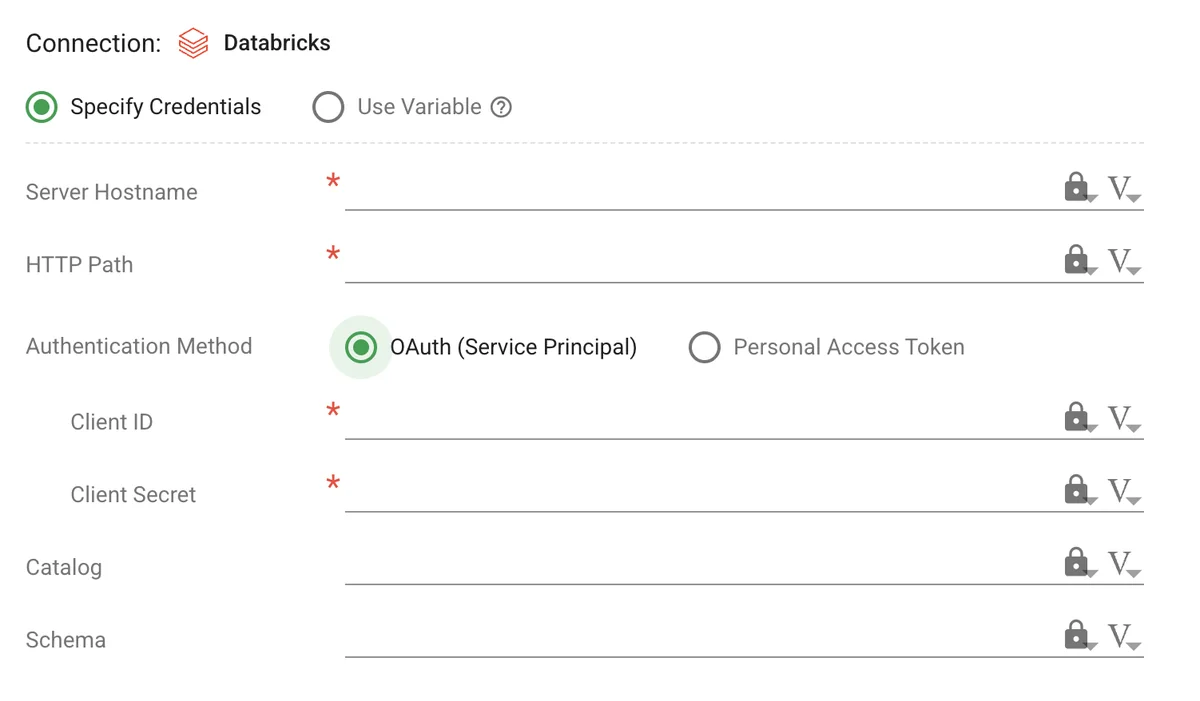
The properties to use when connecting to a Databricks workspace from Automation.
| Field | Scope | Type | Required? | Description |
|---|---|---|---|---|
host |
source/sink | string | yes | Databricks server hostname, for example dbc-a1b2c3d4-e5f6.cloud.databricks.com. Do not include the https:// prefix. The Automation system adds this information automatically. |
http_path |
source/sink | string | yes | HTTP path of the SQL warehouse or cluster, for example /sql/1.0/warehouses/a1b2c3d4e5f6. |
access_token |
source/sink | string | conditional | Databricks personal access token. Required when client_id and client_secret are not set. |
client_id |
source/sink | string | conditional | Client ID of the Databricks service principal. Required, along with client_secret, when access_token is not set. |
client_secret |
source/sink | string | conditional | OAuth secret of the Databricks service principal. Required, along with client_id, when access_token is not set. |
catalog |
source/sink | string | no | Catalog the connection uses by default. |
schema |
source/sink | string | no | Schema the connection uses by default. |
Authentication
A Databricks connection authenticates one of two ways:
- OAuth service principal: Set
client_idandclient_secret. The system requests a machine-to-machine OAuth token for each connection. See OAuth machine-to-machine authentication. - Personal access token: Set
access_token. See Databricks personal access tokens.
Connections
See Connection Properties for more details on connection configurations.
Defined in kitchen-level variables
Using OAuth service principal
databricksConfig
{
    "databricksConfig": {
        "host": "#{vault://databricks/host}",
        "http_path": "#{vault://databricks/http_path}",
        "client_id": "#{vault://databricks/client_id}",
        "client_secret": "#{vault://databricks/client_secret}",
        "catalog": "#{vault://databricks/catalog}",
        "schema": "#{vault://databricks/schema}"
    }
}
Using personal access token
databricksConfig
{
    "databricksConfig": {
        "host": "#{vault://databricks/host}",
        "http_path": "#{vault://databricks/http_path}",
        "access_token": "#{vault://databricks/access_token}",
        "catalog": "#{vault://databricks/catalog}",
        "schema": "#{vault://databricks/schema}"
    }
}
The Connection tab in a Node Editor
Expanded connection syntax
For a data source
source.json
{
    "type": "DKDataSource_Databricks",
    "name": "source",
    "config": {
        "host": "{{databricksConfig.host}}",
        "http_path": "{{databricksConfig.http_path}}",
        "client_id": "{{databricksConfig.client_id}}",
        "client_secret": "{{databricksConfig.client_secret}}",
        "catalog": "{{databricksConfig.catalog}}",
        "schema": "{{databricksConfig.schema}}"
    },
    "keys": {},
    "tests": {}
}
For a data sink
sink.json
{
    "type": "DKDataSink_Databricks",
    "name": "sink",
    "config": {
        "host": "{{databricksConfig.host}}",
        "http_path": "{{databricksConfig.http_path}}",
        "client_id": "{{databricksConfig.client_id}}",
        "client_secret": "{{databricksConfig.client_secret}}",
        "catalog": "{{databricksConfig.catalog}}",
        "schema": "{{databricksConfig.schema}}"
    },
    "keys": {},
    "tests": {}
}
Condensed connection syntax
Note
Note: Do not use quotes for condensed connection configuration variables.
For a data source
source.json
{
    "type": "DKDataSource_Databricks",
    "name": "source",
    "config-ref": "databricksConfig",
    "keys": {},
    "tests": {}
}
For a data sink
sink.json
{
    "type": "DKDataSink_Databricks",
    "name": "sink",
    "config-ref": "databricksConfig",
    "keys": {},
    "tests": {}
}
Other configuration properties
See the following topics for common properties and runtime variables:
Additional Databricks step (key) properties
| Field | Type | Required? | Description |
|---|---|---|---|
query-type |
string | yes | Required. Specifies the type of operation to be performed by a step (key). See notes here for details specific to Databricks sources and sinks. execute_query: (sources only) Executes a query and exports the resulting rowset in the format specified by the format field. Sets the row_count and column_count runtime variables. execute_scalar: (sources only) Performs a query for a scalar value, like sum(), count(), etc. The query must return exactly one column; the value is written to the output file and to the result runtime variable. execute_non_query: (sources only) Intended for DML/DDL statements. No rowset is written. execute_dml: (sinks only) Uses an insert template string for creating the insert sentence. bulk_insert: (sinks only) Performs a bulk insert from the input data. |
fetch-rows |
integer | no | The number of rows the source retrieves from Databricks per batch while writing the output file. Availability: Databricks sources where query-type is execute_query. Default value: 1000 |
ignore-errors |
boolean | no | Indicates if the node should continue processing even if the SQL statement generates an error. Set this field in the node JSON; the Node Editor does not expose it for Databricks. Availability: Databricks sources only. Default value: false |
Each source step takes a single SQL statement. To run several statements, declare a key for each one.
Note
DATE SQL types handling: For DATE SQL types, the Databricks source uses the Python datetime format to return DATE fields: '%Y-%m-%d %H:%M:%S'.
When a Databricks sink loads data from input files, it expects DATE fields in this datetime format.
File encoding requirements
Files used with data sources and data sinks must be encoded in UTF-8 in order to avoid non-Unicode characters causing problems with sinking data to database tables and errors when running related tests
For CSV and other delimited files, use Save as in the program and select the proper encoding, or consider using a text editor with encoding options.
Data source example
source.json
{
    "type": "DKDataSource_Databricks",
    "name": "source",
    "config-ref": "databricksConfig",
    "keys": {
        "create_table": {
            "sql": "CREATE TABLE IF NOT EXISTS {{databricks_catalog}}.{{databricks_schema}}.test_data1 (colone STRING, coltwo INT)",
            "query-type": "execute_non_query"
        },
        "insert_data": {
            "sql": "INSERT INTO {{databricks_catalog}}.{{databricks_schema}}.test_data1 VALUES ('Hello', 1), ('World', 2)",
            "query-type": "execute_non_query"
        },
        "row_count": {
            "sql": "SELECT COUNT(*) FROM {{databricks_catalog}}.{{databricks_schema}}.test_data1",
            "query-type": "execute_scalar",
            "set-runtime-vars": {
                "result": "test_data1_row_count"
            }
        },
        "my_query": {
            "target-field": "sql",
            "resource-file": "databricks/select.sql",
            "query-type": "execute_query",
            "format": "csv",
            "insert-column-names": true,
            "fetch-rows": 5000,
            "set-runtime-vars": {
                "column_count": "my_query_column_count",
                "row_count": "my_query_row_count"
            }
        }
    },

    "tests": {
        "test-runtime_variable_test_data1_row_count": {
            "test-variable": "test_data1_row_count",
            "action": "stop-on-error",
            "test-logic": "test_data1_row_count == 2"
        },
        "test-runtime_variable_my_query_column_count": {
            "test-variable": "my_query_column_count",
            "action": "stop-on-error",
            "test-logic": "my_query_column_count == 2"
        },
        "test-runtime_variable_my_query_row_count": {
            "test-variable": "my_query_row_count",
            "action": "stop-on-error",
            "test-logic": "my_query_row_count == 2"
        }
    }
}
Data sink example
sink.json
{
    "type": "DKDataSink_Databricks",
    "name": "sink",
    "config-ref": "databricksConfig",
    "keys": {
        "insert_template": {
            "insert-template": "INSERT INTO {{databricks_catalog}}.{{databricks_schema}}.test_data2 (colone, coltwo) VALUES (%s, %s)",
            "query-type": "execute_dml",
            "format": "csv",
            "first-row-column-names": true
        },
        "insert_bulk_csv": {
            "table-name": "{{databricks_catalog}}.{{databricks_schema}}.test_data3",
            "query-type": "bulk_insert",
            "format": "csv"
        },
        "insert_bulk_ddl": {
            "table-name": "{{databricks_catalog}}.{{databricks_schema}}.test_data4",
            "query-type": "bulk_insert",
            "format": "csv",
            "table-ddl": "CREATE TABLE IF NOT EXISTS {{databricks_catalog}}.{{databricks_schema}}.test_data4 (colone STRING, coltwo INT)"
        }
    }
}