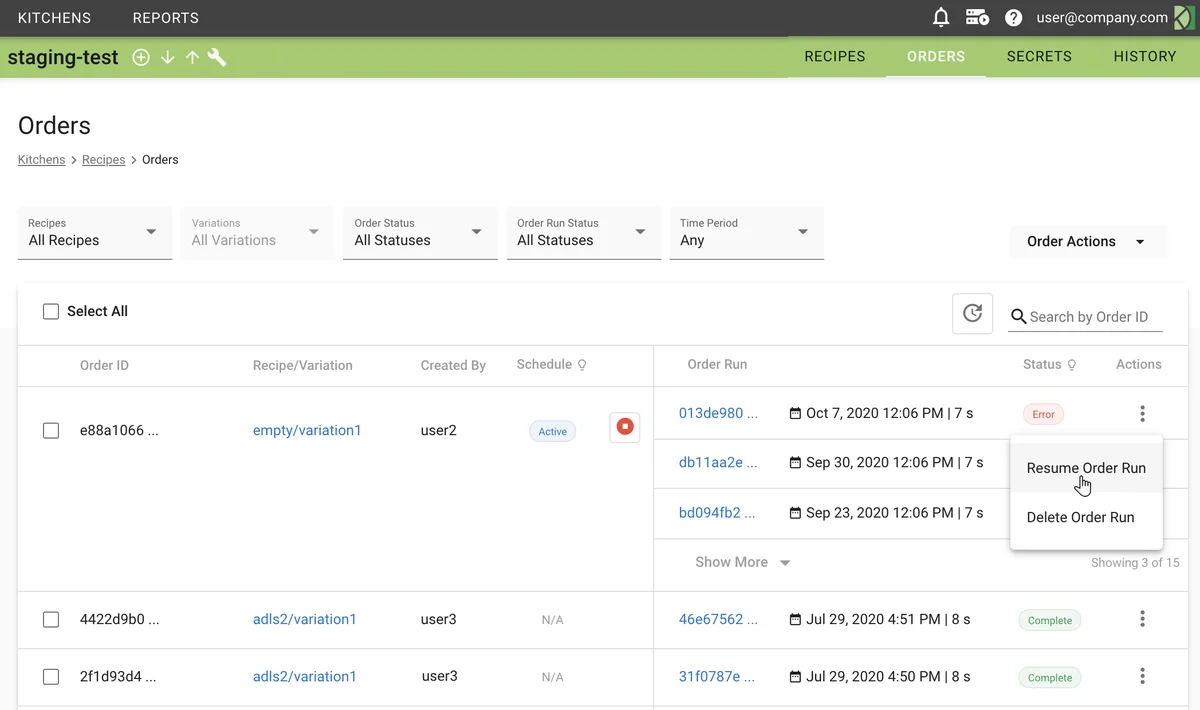
Resume Order Runs
Both the Resume Order Run function in the UI and the orderrun-resume command in the CLI give you an opportunity to resolve problems in your recipe variation and continue with order processing.
Resume an order run
You can restart failed order run at the point of failure.
- In the UI, navigate to a resume function.
- On the Orders page, select Resume Order Run from the Actions menu for an order run showing an Error status.
- On the Order Run Details page, click Resume Order Run.
- In the command line interface, run the orderrun-resume command.
Command
Note
Resume function creates a new order run. When a stopped or failed order run is resumed, the system puts the initial run into a Resumed state and starts a new order run to process the remaining nodes of the recipe variation. Note that the two order runs record separate timings and test results, and the initial run retains the Resumed status permanently.
Resume options
Failed nodes
Choose what the resumed run does with the nodes that failed.
- Retry failed nodes (default) runs them again, then continues with the rest of the graph.
- Skip failed nodes leaves them alone and runs the nodes that come after them. Use this when a node's failure does not matter to the work that follows it. A downstream node may fail in turn if it needs data the skipped node produces. A branch that the skipped node gates with a condition is not run, because the node never got far enough to decide that condition.
A skipped node keeps a Skipped status in the resumed run's node list, and the run completes successfully if everything else succeeds.
Variable values
The dialog lists the variables the resumed run will start from, with the value each one will hold, so you can see what will be applied before changing anything. Search and filter the list the same way you do when running a variation. Edit any value to override it for this run only — a recurring order's later runs are unaffected. A variable the variation marks Locked is not editable in the dialog.
The listed values are composed the same way the run composes them, but they are not re-resolved: a variable whose value refers to another one is shown as written rather than as it will read at run time.
In the CLI, pass overrides with --params:
~/Kitchens/Dev_Sprint $ dk orderrun-resume -k MyKitchen -p '{"batch_size":500}' 3ae83e0a-f7cc-11e7-9d16-12d21ed7cc90
Variable values in a resumed run
A resumed run starts from these values, in increasing order of precedence:
- Variables read fresh from
variables.json, the variation's override set, the kitchen overrides, and the parameters the order was started with. Editing any of these between the failed run and the resume takes effect, which is what lets you correct a variable and resume. - Values that nodes set during the previous attempt — runtime variables, ingredient outflow variables, and
test result variables. These carry over, so a counter a node advanced to
1is still1. This includes values a failed node set before it failed, so on Retry failed nodes a node that increments a variable applies the increment again. - Variable overrides set on the resume itself.
Built-in variables such as CurrentOrderRunId and ScheduledOrderRunTime always describe the resumed run.
Visual example in Automation